
Nail salon turn tracker
Nail Salon Turn Tracker for Walk-In Rotation
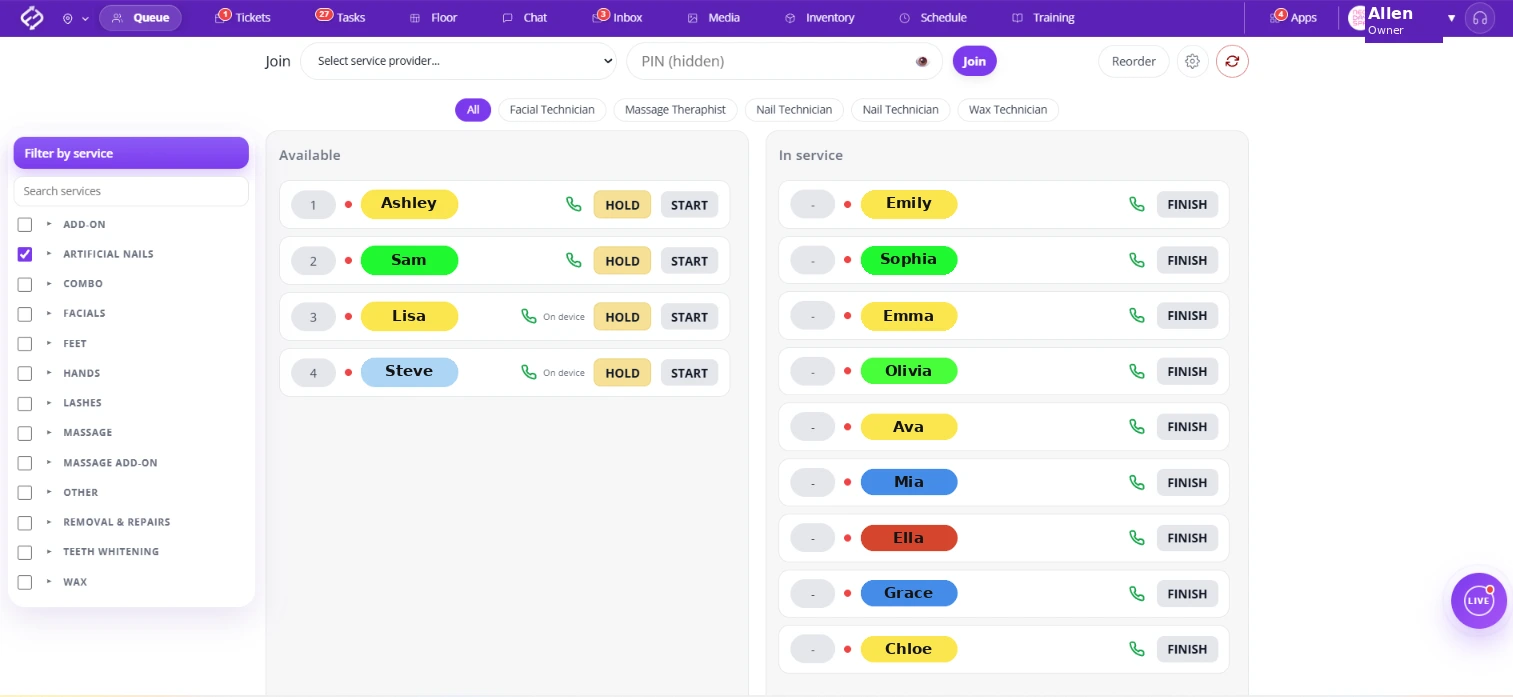
Fair Flow started on a working nail salon floor. The turn system and turn tracker live in one rotation the whole team can see, who is available, who is in service, who is on hold, with unlimited staff on one price. It is not a POS and has no POS integration: Fair Flow runs the floor next to the booking and checkout tools you already use. Filter the board by technician type, such as nail, facial, massage or wax, or filter by service: tick a category or one specific service and see only the employees set to do it, in turn order.
The turn tracker is only the start. Fair Flow is a complete salon management system: service tickets, tasks, floor requests, team chat and inbox, staff schedule, time clock, inventory and training in one place, so the whole salon day runs from the same system, not from a single tracker.
From $39/month per location · unlimited staff · 14-day free trial · no card
See plans and pricingSee the turn tracker in a 15-min walkthrough.
How a turn tracker works
Transcript
Intro. One screen for the whole floor. Who is free, who is busy, and who is next — always visible, always in order. Available · In service · Start · Hold · Finish.
The title screens open, then the Queue board appears with Available and In service columns.
01 The Queue at a glance. Available providers wait in order — In service shows who is busy right now.
The board shows named providers in colored pills under Available and under In service.
02 Start a service. Tap START and enter your PIN — the provider moves to In service.
START is tapped next to a provider in Available; a PIN dialog opens; after OK the provider appears at the bottom of In service.
03 Finish a service. Tap FINISH and enter your PIN — the provider goes back to the end of the line.
FINISH is tapped next to a provider in In service; a PIN dialog opens; after OK the provider returns to the bottom of Available.
04 Hold. Short service? Put a provider on HOLD to keep their place in line (manager code).
HOLD is tapped; an admin or manager code dialog opens; after OK the button label changes to RELEASE.
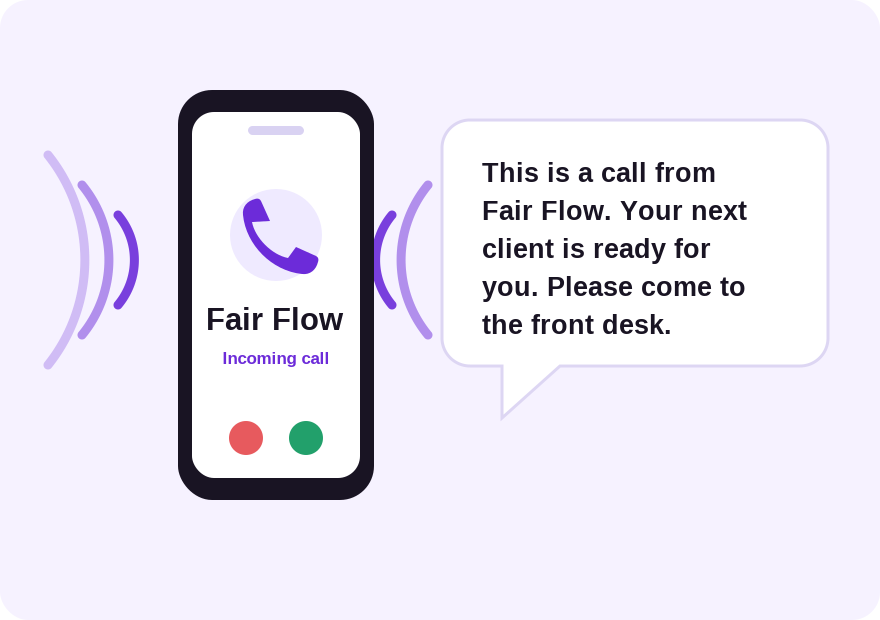
05 Call a provider. Tap the phone — the provider gets a Fair Flow call on their phone and simply answers.
The phone icon is tapped; an on-screen phone shows an incoming Fair Flow call with “You are up next,” Decline, and Answer.
06 Filter by profession. Tabs at the top — show only nail, facial, massage or wax technicians.
Tabs such as Facial Technician and Wax Technician are selected; the Available list updates to that profession.
07 Filter by service. Pick a service and see only the providers who do it — no need to remember who does what.
Filter by service opens a sidebar of categories and services; a service is checked and Available shows only matching providers.
08 Reorder mode. Tap Reorder, then use the arrows to move a provider up or down.
Reorder is tapped; up and down arrows appear beside Available providers.
09 Reorder mode. Move a provider to the top of the line in seconds.
Arrow controls move a named provider higher and lower in the Available order.
10 Add a provider. Add a service provider straight into Available.
+ Add service provider opens a dialog; a name is chosen from the dropdown and Add places them in Available.
11 Queue settings. Auto-reset the queue every day — optional location restriction.
Settings show toggles and time fields for Queue Auto Reset and Queue Location Restriction.
12 Join the queue. Select your name, enter your PIN and tap Join.
In the top bar a provider is selected, a PIN is entered, and Join is tapped.
Outro. Fair Flow — Built by a salon owner, for salon owners.
Closing title card with the Fair Flow website URL.
What a nail salon turn tracker does
A nail salon turn tracker keeps one numbered list of who takes the next walk-in. Technicians join the Available list in order. Start moves a technician to In service, and Finish sends them to the back of the list. When someone steps away for a break, lunch or a quick service, Hold keeps their place, and every turn is a full turn. Turn counts and a day-by-day history settle questions with a record instead of memory. Because each employee's services are set once on their profile, filtering by a service like gel, acrylic or a manicure shows only the technicians who actually do it.
One tap calls the next tech
When a walk-in is ready, the front desk taps once on the board and Fair Flow calls the next technician's phone. A voice message tells them their client is waiting and asks them to come to the front desk. Add each team member's phone number once, and the call goes to that number when their turn comes up.
It takes the place of pagers and of calling a name across the salon. The tech hears it wherever they are on the floor, and the client is not left waiting while someone goes to find them.
Built on a working nail salon floor
Fair Flow was not designed in an office. It came out of the daily walk-in rotation at a working nail salon, where the turn list lived on paper and in people’s memory, and where every busy afternoon ended with someone sure they had been skipped. The turn tracker is the first thing we built, because it was the first thing that broke.
That is also why there is no per-technician fee. A nail floor only works when every technician is on the board, so the price is per location and the whole team is included, four people or forty.
How a turn works in Fair Flow
- A technician joins the numbered Available list (joining needs permission, at least one technician type, and a PIN)
- The order on that list is the walk-in rotation everyone sees
- Start moves the technician to In service
- Finish sends them to the back of Available
- Hold parks someone in their place for lunch or a call; Release brings them back in the same spot
- Managers with permission can reorder; joins, starts, finishes, holds and reorders are logged
No half turns, hold covers it
Some turn tools count a quick service as a “half turn.” Fair Flow does not use half turns. Every turn is a turn. When a technician needs to step away, or should not lose their position for a short gap, you put them on hold: they keep their place in the rotation and come back exactly where they were. That keeps the rule simple enough for the whole floor to read at a glance.
Hold means a smaller, shorter service does not cost you your turn. Hold keeps your place in the rotation while you take that small service, so you do not miss your turn. You finish the quick service and your place in line is still yours.
What the desk still decides
Nail services are not interchangeable, a gel fill is not a pedicure. Fair Flow lets the team filter the board by technician type. It does not automatically match a walk-in’s service to a technician, and it does not auto-skip anyone. The front desk still makes that call, on a board everyone can see.
Turn counts and history
- See how many turns each technician took today
- Look back at any day’s turn history
- Settle “I was skipped” with a record instead of memory
POS turn list vs a dedicated turn tracker
Many nail POS products include a turn list next to checkout. That can be enough for some salons. If your floor still argues about the turn, read POS turn list vs a dedicated nail turn tracker, the rules in how a fair walk-in rotation works, or the broader salon turn system and walk-in queue page.
What sits next to it
- Digital service tickets from technicians’ phones
- Floor requests from the station to reception, including a restaurant order
- Time clock and staff schedule
- Tasks and the employee inbox for requests and approvals
- Multiple locations with the same rotation discipline
What it does not do
- No client online booking or appointment book, keep the booking tool you already use
- No POS, checkout or card processing
- No payroll filing and no tip pooling
- Clients do not see their place in the walk-in queue
Pricing
- Starter: $39/month per location
- Pro: $99/month for the first location
- Pro, each additional location: $79/month
- Unlimited staff at every location
- Extra storage: $10/month per 10 GB after 5 GB
- 14-day free trial · month to month
FAQ
Does Fair Flow support half turns?
No. Fair Flow does not use half turns. Instead, a technician can be put on hold and keeps their place in the rotation while they take a smaller, shorter service, so it does not cost them their turn. That covers the cases where salons would otherwise give a half turn.
How does the next tech know their client is waiting?
One tap on the board and Fair Flow calls their phone. A voice message tells them their client is waiting and asks them to come to the front desk, so there is no pager to carry and no name called across the salon.
Who is next for a specific service?
Services are set once on each employee's profile: what they do and what they do not do. Tick a service category like Combo, Feet or Hands, or one service inside it like Manicure or Pedicure, in the Queue filter and the board shows only the employees set to do that service, in turn order. The desk does not have to remember who does gel, acrylic or a manicure.
Does it replace my POS?
No. Fair Flow is not a POS and does not integrate with POS systems. It runs the walk-in rotation and floor operations next to the booking and checkout tools your salon already uses.
Can clients see the turn tracker?
No. It is an internal tool for the team inside the salon. Clients do not see their place in line.
Can a technician take a break without losing their turn?
Yes. Put them on hold and release them when they are back. They return to the same spot.
Is there a per-technician fee?
No. Starter at $39/month per location, or Pro at $99/month for the first location and $79/month for each additional one, with unlimited staff.
Does it work for more than one location?
Yes. Each location keeps its own team and queue, with a company-level view across locations.
Is there a free trial?
Yes. Every plan includes a 14-day free trial, month to month, with unlimited staff.
Is there a free nail salon turn tracker?
Fair Flow is not free, but every plan starts with a 14-day free trial, so you can run your real walk-in rotation before you pay. After the trial, Starter is $39/month per location with unlimited staff and no per-technician fee. Free turn apps usually stop at a turn list. For $39 you get a live rotation the whole team can see, Hold so a tech keeps her place, service filters, turn history, and one-tap calls that ring the next tech's phone. Fewer missed turns and fewer arguments at the desk usually pay for it in the first week. If you are weighing a free turn app, read Is Smart Turn Tracker free?.
Who built Fair Flow?
Fair Flow started on a working nail salon floor. The turn tracker was built around how a real front desk runs walk-ins, holds and calls to the next tech.
More comparisons
Put the whole nail floor on one turn board
Book a demo, or start your 14-day free trial.
See the feature page: Fair Flow Queue.