Skip to content

Salon management platform

Run your entire salon.
Not just the calendar.

Salon operations software with a nail salon turn system

Built for busy floors and walk-ins. See the turn tracker.

Fair Flow connects your team, walk-ins, tickets, schedules, time clock, tasks, inventory and training in one place.

From $39/month per location · unlimited staff · 14 days free · no card

Built by salon owners for busy salon teams.

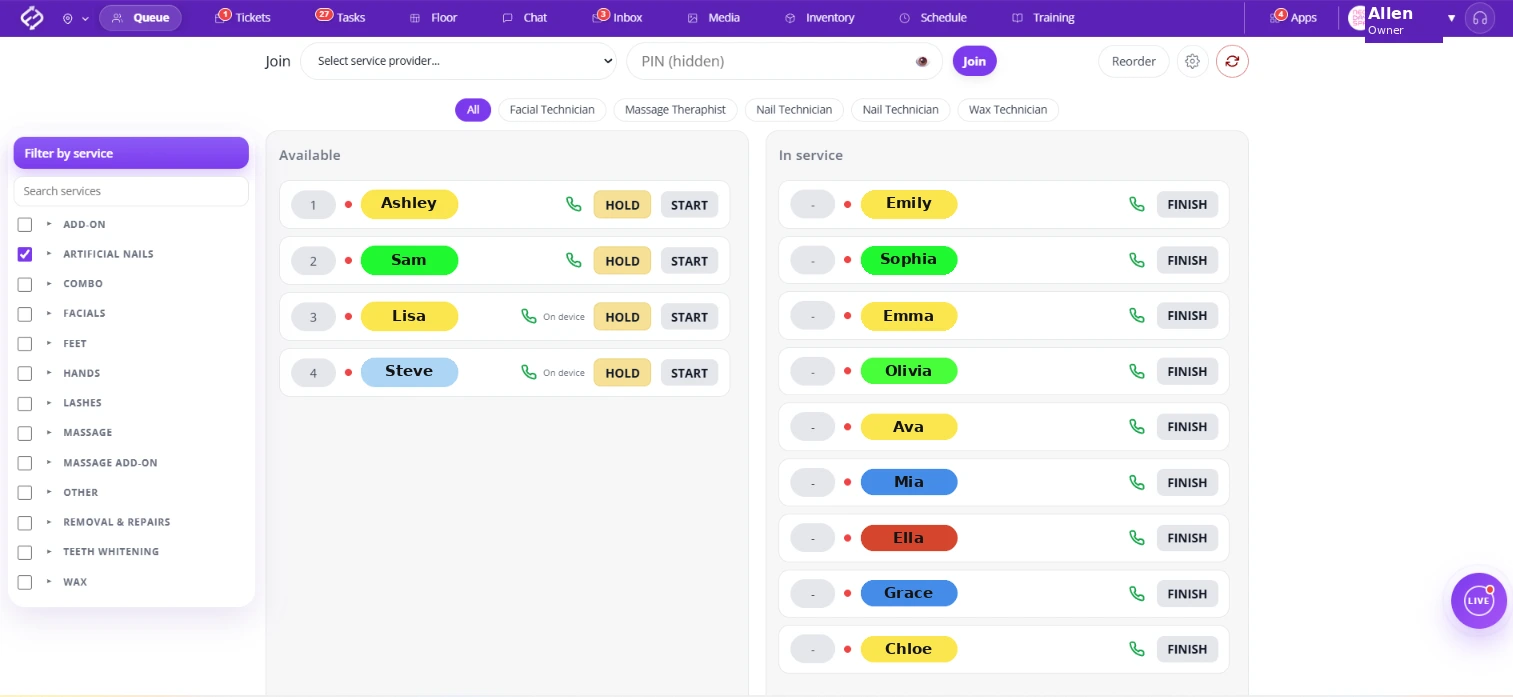
Fair Flow Queue board with a Filter by service sidebar, service categories and checkboxes, technician type filter chips, and a numbered list of available technicians with an in service column

Built by salon owners

We own salons. We built this for ours.

Fair Flow started at our own front desk, in the middle of the weekly "she skipped me" argument. There was no record to point at, so we made one. Everything else here — tickets, time clock, checklists, licenses, inventory — came from the same place: our floor, our problems, fixed on our own shifts.

How a turn tracker works

Transcript

Intro. One screen for the whole floor. Who is free, who is busy, and who is next — always visible, always in order. Available · In service · Start · Hold · Finish.
The title screens open, then the Queue board appears with Available and In service columns.

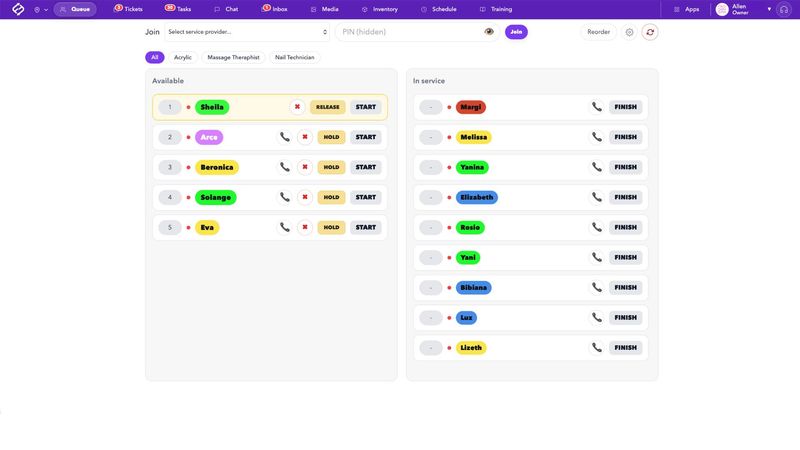
01 The Queue at a glance. Available providers wait in order — In service shows who is busy right now.
The board shows named providers in colored pills under Available and under In service.

02 Start a service. Tap START and enter your PIN — the provider moves to In service.
START is tapped next to a provider in Available; a PIN dialog opens; after OK the provider appears at the bottom of In service.

03 Finish a service. Tap FINISH and enter your PIN — the provider goes back to the end of the line.
FINISH is tapped next to a provider in In service; a PIN dialog opens; after OK the provider returns to the bottom of Available.

04 Hold. Short service? Put a provider on HOLD to keep their place in line (manager code).
HOLD is tapped; an admin or manager code dialog opens; after OK the button label changes to RELEASE.

05 Call a provider. Tap the phone — the provider gets a Fair Flow call on their phone and simply answers.
The phone icon is tapped; an on-screen phone shows an incoming Fair Flow call with “You are up next,” Decline, and Answer.

06 Filter by profession. Tabs at the top — show only nail, facial, massage or wax technicians.
Tabs such as Facial Technician and Wax Technician are selected; the Available list updates to that profession.

07 Filter by service. Pick a service and see only the providers who do it — no need to remember who does what.
Filter by service opens a sidebar of categories and services; a service is checked and Available shows only matching providers.

08 Reorder mode. Tap Reorder, then use the arrows to move a provider up or down.
Reorder is tapped; up and down arrows appear beside Available providers.

09 Reorder mode. Move a provider to the top of the line in seconds.
Arrow controls move a named provider higher and lower in the Available order.

10 Add a provider. Add a service provider straight into Available.
+ Add service provider opens a dialog; a name is chosen from the dropdown and Add places them in Available.

11 Queue settings. Auto-reset the queue every day — optional location restriction.
Settings show toggles and time fields for Queue Auto Reset and Queue Location Restriction.

12 Join the queue. Select your name, enter your PIN and tap Join.
In the top bar a provider is selected, a PIN is entered, and Join is tapped.

Outro. Fair Flow — Built by a salon owner, for salon owners.
Closing title card with the Fair Flow website URL.

Your booking software manages appointments. Fair Flow manages the salon.

From the moment your team clocks in to the last ticket of the day, Fair Flow keeps your people, floor and operations connected.

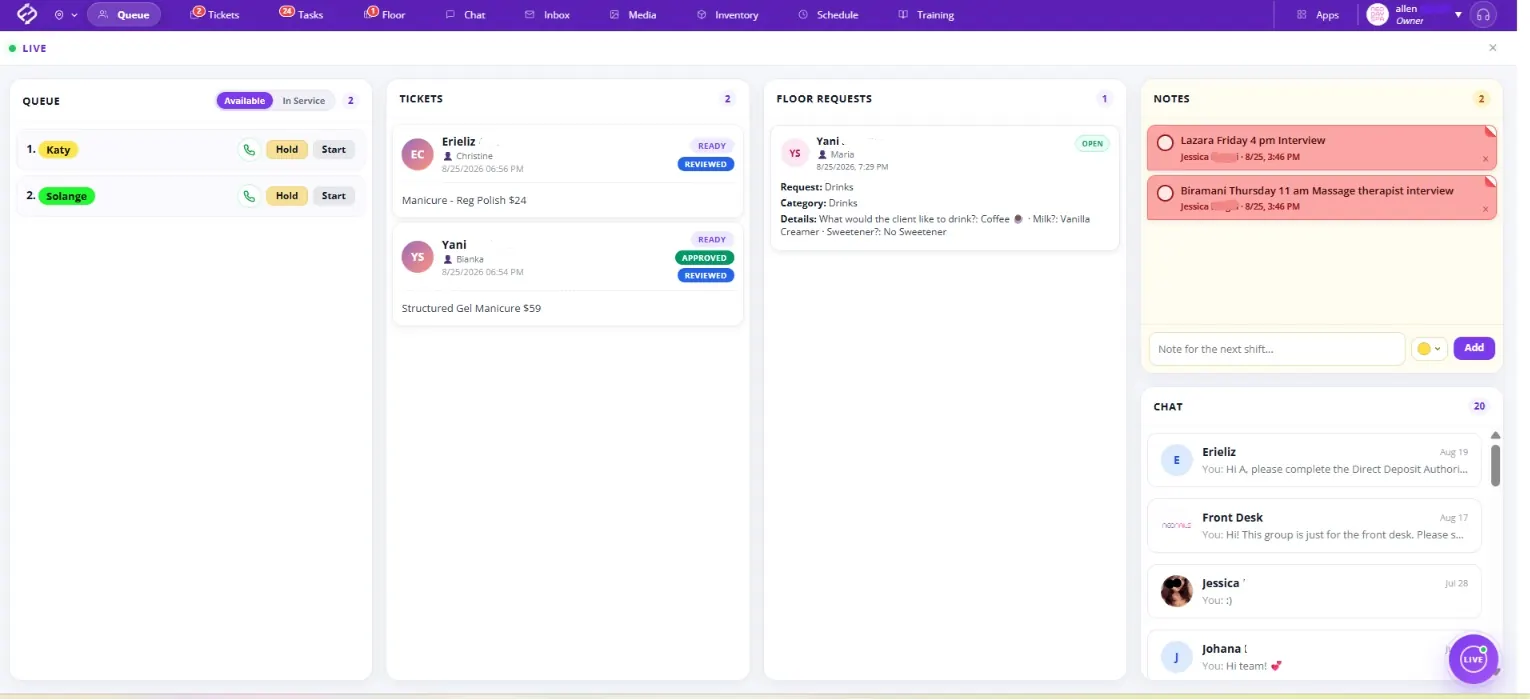
Fair Flow LIVE view of the salon floor with queue, tickets, floor requests, notes, and chat

Everything happening around the appointment book.

Who should take the next walk-in?

Which employee is available right now?

Which service ticket is still open?

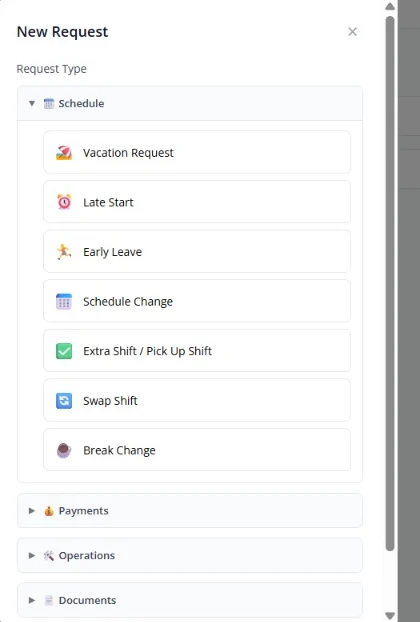
Was that schedule request approved?

What is happening at every location?

Fair Flow dashboard answering who is available and what is open on the floor
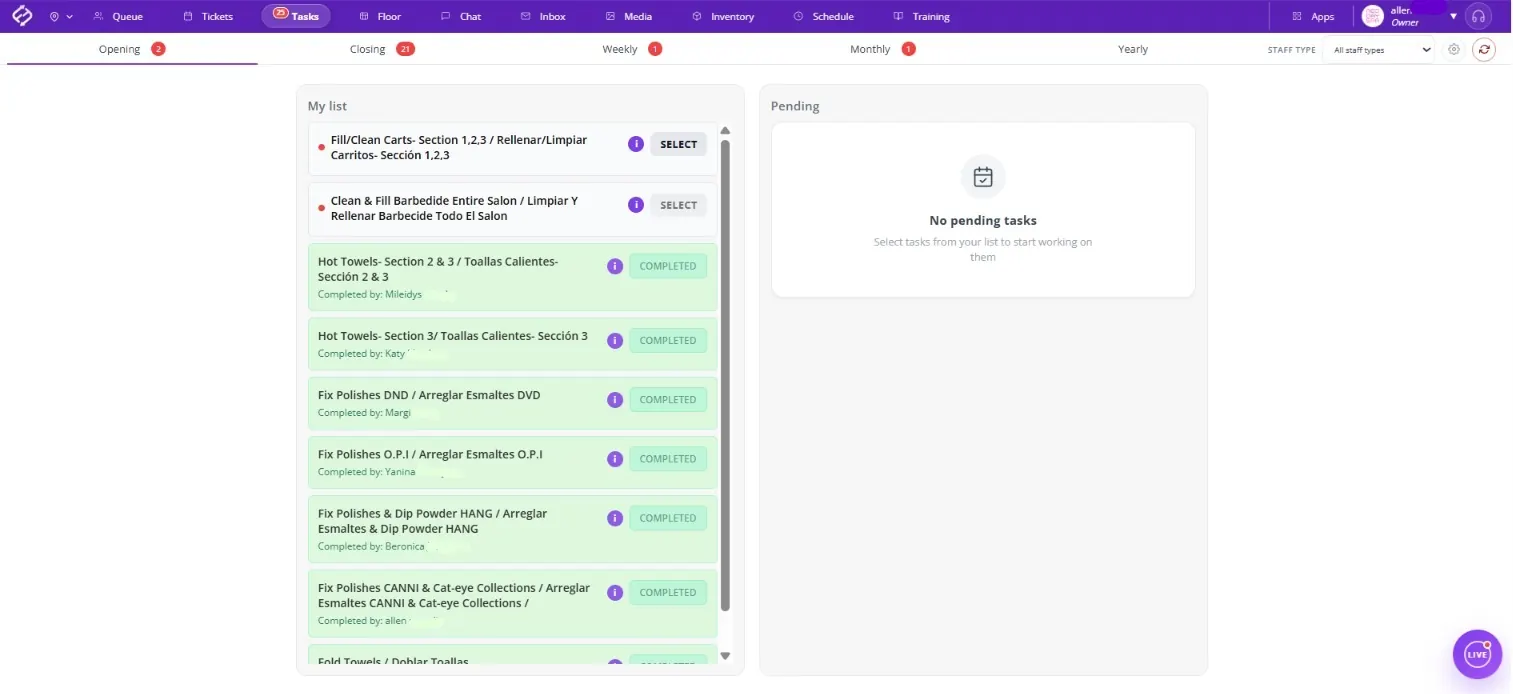
Fair Flow Tasks with opening checklists, My list, and pending work for the salon floor

See the operation

See what is happening across the business.

Track daily activity, inventory, performance and multiple locations without piecing information together.

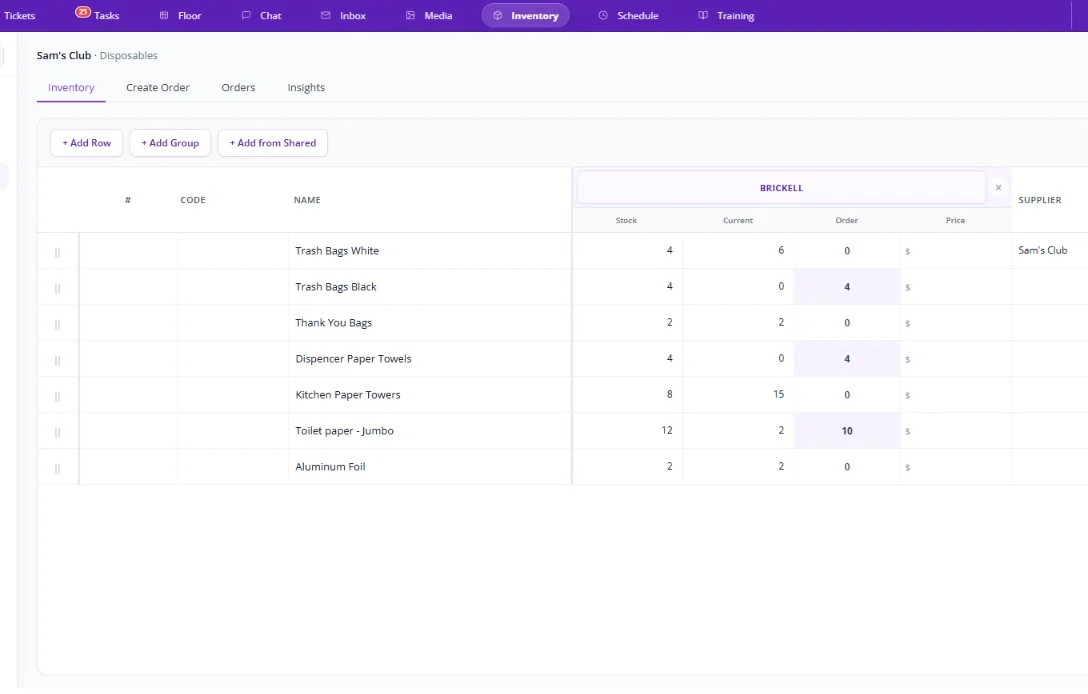
Fair Flow inventory list showing stock, current counts, and reorder amounts for salon supplies

One connected flow from clock-in to completed service.

Each step feeds the next. The floor does not live in a separate app from the schedule, the ticket, or the manager view.

Employee views the schedule.

Employee clocks in.

A walk-in enters the queue.

The right employee is notified.

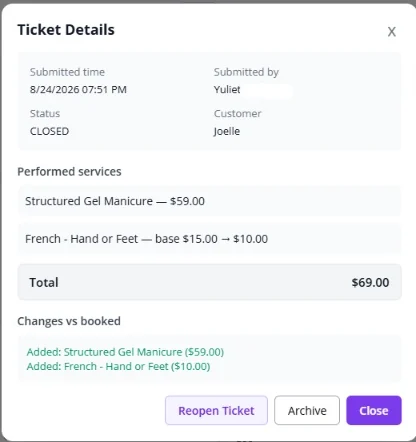
A digital ticket is created.

Management sees it in real time.

Built by salon owners

Built inside a real, busy salon.

Fair Flow was created by salon owners who were tired of managing daily operations through paper lists, group messages and disconnected systems. It was built around the realities of running a busy team, not around a generic office workflow.

We didn’t adapt project-management software for salons. We built salon operations software from the floor up.

Simple pricing for one location or many.

Starter

$39/month per location

Queue and turn tracker, tasks, and unlimited staff calling. Unlimited staff.

Pro

$99/month, first location

Everything in Fair Flow: queue, tickets, floor, schedule, time clock, inbox, chat, inventory, training and more. Unlimited staff. 5 GB storage included.

More Pro locations

$79/month each

Full Pro platform for each additional location.

Storage

$10/month per 10 GB

5 GB is included. Then $10 per month for every extra 10 GB.

14-day trial included.

Frequently asked questions

Does Fair Flow replace my booking software?

No. Fair Flow sits alongside your booking software and runs the salon floor: turns, tickets, time clock, tasks and more.

Do I need a credit card for the trial?

No. The 14-day free trial does not need a credit card.

How long does setup take?

About 3 minutes to create your salon and add your team.

Can I cancel?

Yes. Fair Flow is month to month, and you can cancel in one click.

Is there a limit on staff?

No. Every plan includes unlimited staff.

Your salon already has a booking system. Now give it an operating system.

See how Fair Flow can bring your team, floor and daily operations together.