
Connected to the schedule
You choose how early staff may clock in before their shift, so hours match the schedule you published.
Features · Time Clock
Clock-ins tied to the schedule, a photo at every clock-in, and a kiosk or location check so staff clock in from the salon. Managers get clear hours and estimated pay totals, ready for payroll.
Early clock-ins, punches from someone else's code, and hours added up by hand make the end of the week harder than it should be. Time Clock works with your schedule so the hours you see are the hours that were worked. With photo clock-in and an optional time clock kiosk, it is an employee time clock app built for salons.
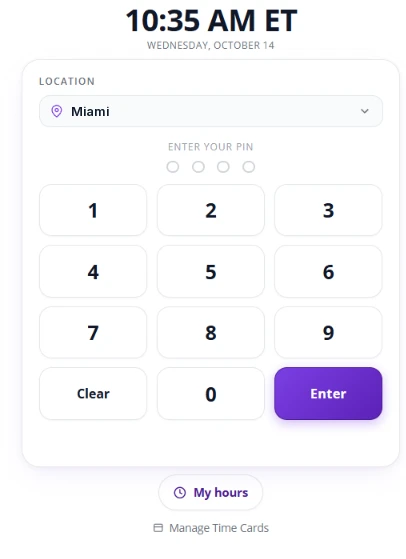
Kiosk clock-in
Staff clock in with their PIN on the salon's kiosk, and can check their hours right there.
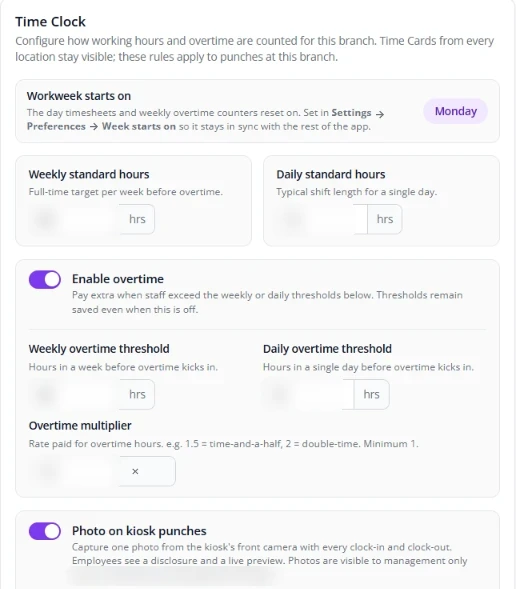
Your rules
Set your workweek, standard hours, weekly and daily overtime thresholds, and the overtime multiplier. Kiosk photos are visible to management only and deleted automatically after 90 days.
You choose how early staff may clock in before their shift, so hours match the schedule you published.
A photo confirms it was really them, not someone using another person's code, and that they were in the salon. Photos are visible to management only and deleted automatically after 90 days.
Set up a kiosk, like an iPad, so staff clock in only there. The kiosk app also runs Tasks and Queue.
Allow clock-in from staff's own phones only when they are at your salon. You set the location.
This week, last week, or any date range, right on their phone.
Managers can add or correct punches for a specific team member.
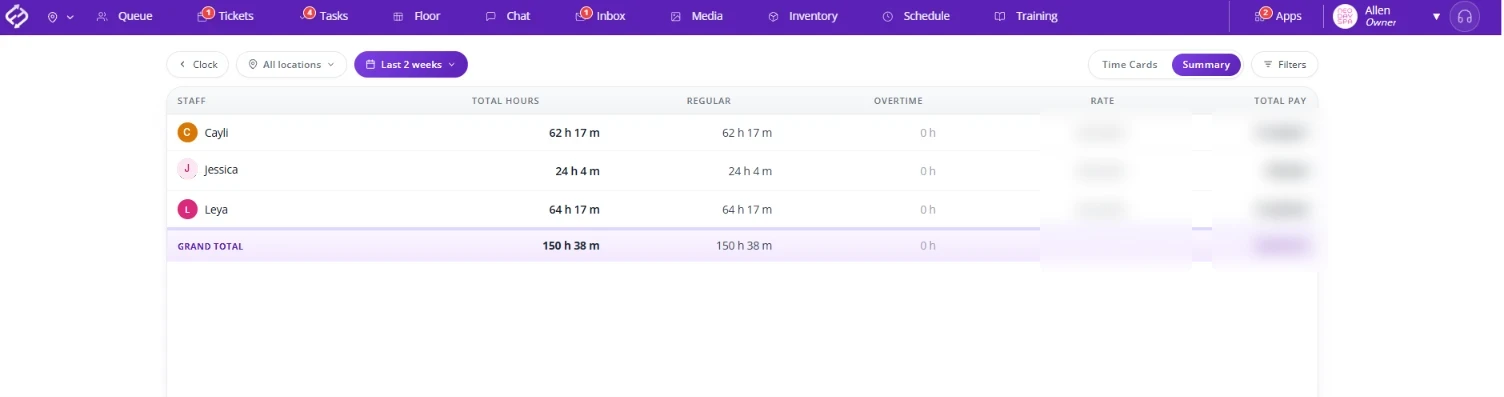
See a clear summary of hours worked across your team.
Set an hourly rate in each profile and see estimated pay totals, with weekly or daily overtime (for example 1.5x) flagged, ready for your payroll.
Fair Flow is not payroll, payments, booking or POS software. Time Clock shows hours and estimated pay totals that you take to your own payroll. Pricing is $99/month for the first location and $79/month for each additional location.
See also Schedule, Inbox and our salon time clock overview.
Related reading: Salon time clock app, Salon time clock software for the floor.
Only as early as you allow. Time Clock is connected to Schedule, so you choose how early staff may clock in before their shift, for example 15 or 30 minutes.
A photo is taken at clock-in, so you know it was the right person, not someone using another person's code, and that they were in the salon.
It is optional. Use a kiosk like an iPad so staff clock in only there, or allow clock-in from their own phone only when they are at your salon's location.
Yes. Staff can see their hours for this week, last week, or a date range.
No. Fair Flow is not payroll or payments software. Managers see hours and estimated pay totals with overtime flagged, ready to take to your payroll.
Yes. Staff can clock in from their phone with a location check, or you can use an optional kiosk in the salon.
$99/month for the first location and $79/month for each additional location.
We will walk you through Time Clock with your team and schedule in mind.