
Everything in one profile
Schedule, locations, permissions, services and products for each team member, in one place.
Features · Staff Profiles
Everything about each team member in one place, from schedule and permissions to write-ups and signed documents. New hires complete their paperwork online, so there are no more paper forms.
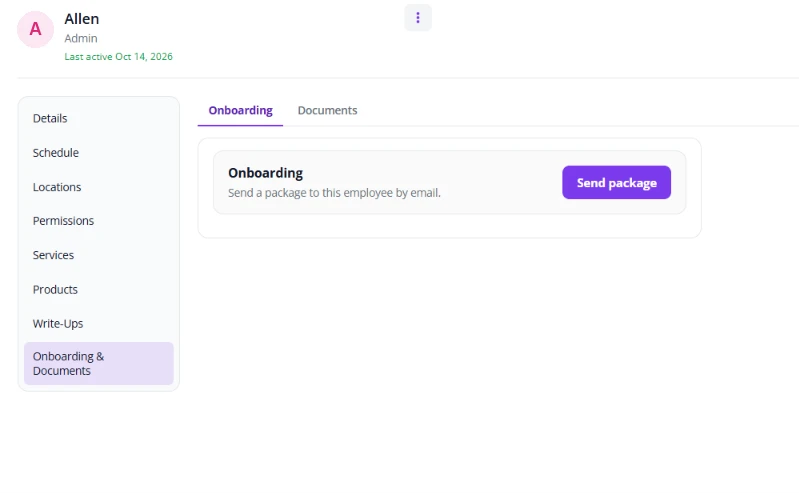
Inside each staff member's profile: their schedule and the locations they work, their permissions, the services they perform, products, their monthly points goal, and their earning rules: service and product commission rates and hourly rate. No more digging through binders, spreadsheets and old messages. No more printed write-up forms or new hire paperwork in binders.
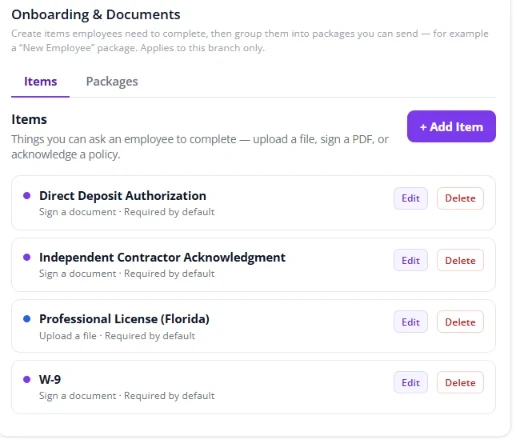
Create your own items: upload a file, sign a PDF or acknowledge a policy, such as your employee handbook. Group them into packages, such as a W-2 package and a 1099 package with items like a W-9, direct deposit authorization, independent contractor acknowledgment or a professional license upload.
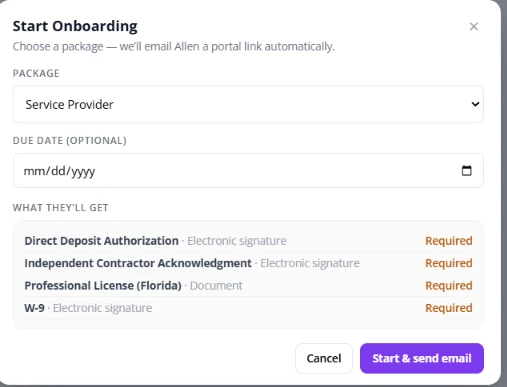
Click Send package and the new employee gets an email with a portal link to sign and complete everything electronically. Add an optional due date and mark items as required.
You always have a record of where each person is, and their documents are stored in their profile.
When something needs to be addressed formally, issue a write-up. The staff member gets an email letting them know, and you keep a clear record in their profile. Your salon sets its own policy for how write-ups are handled.
Schedule, locations, permissions, services and products for each team member, in one place.
Set what each staff member can see, so everyone has what they need and nothing more.
Each person's monthly points goal and earning rules (service commission, product commission and hourly rate) live in their profile.
Formally note an issue. The staff member is notified by email, and the record stays on file.
Create items to upload a file, sign a PDF or acknowledge a policy, such as your employee handbook.
Group items into packages, such as a W-2 package and a 1099 package.
One click sends the new hire a portal link to complete everything electronically.
See who has finished and what is still open, with documents stored in their profile.
Fair Flow is not booking, POS, payroll or payments software. Staff Profiles keep your team's information and paperwork organized and work alongside the tools you already use. Pricing is $99/month for the first location and $79/month for each additional location.
You choose the documents and policies you use. Fair Flow does not provide legal or tax advice.
See also Schedule, Time Clock, Training, Inbox and Fair Flow Points.
Related reading: Salon employee license tracking.
Each team member's schedule and the locations they work, their permissions (what they can see), the services they perform, products, their monthly points goal and hourly rate, plus write-ups and onboarding documents.
You create your own items, such as a file to upload, a PDF to sign or a policy to acknowledge, and group them into packages. Click Send package and the new employee gets an email with a portal link to complete everything electronically.
Yes. For example, a W-2 package and a 1099 package, each with its own items like a W-9, direct deposit authorization, independent contractor acknowledgment or professional license upload.
Yes. A due date is optional, and items can be marked as required.
A formal written warning about an issue. The staff member gets an email letting them know, and you keep a record. Your salon sets its own policy for how write-ups are handled.
No. Fair Flow is not booking, POS, payroll or payments software. It works alongside the tools you already use.
Send an onboarding package and the new employee gets an email with a portal link to sign and complete everything online.
Yes. Write-ups are issued in Fair Flow, the staff member gets an email letting them know, and the record stays in their profile.
Yes. Each staff member's earning rules hold their service commission rate, product commission rate and hourly rate. Tickets use those rates to show what each service and product earns them.
$99/month for the first location and $79/month for each additional location.
We will walk you through Staff Profiles and onboarding with your team in mind.