
One Inbox for Every Salon Employee Request
Monday morning, the owner opens WhatsApp looking for one answer: who is off next Thursday. Last week someone asked for vacation in the group chat. Someone else texted a manager about switching Saturday for Tuesday. A technician told the front desk that acetone was almost gone. A license photo arrived in a personal thread. A payroll question and a broken dryer were mentioned in passing at the desk.
By Monday, none of that is easy to reconstruct. The vacation message is buried under forty stickers. The schedule change was a “yes” in a thread that never reached the person who publishes the week. The supply comment never became an order. The license photo is on a phone that is not at work. Nobody can say, from a record, what was approved and who was supposed to handle the rest.
This is not a communication problem. It is a salon employee request management problem.
Why group chats fail as an employee request system
Chat is good at conversation. It is a poor staff request app.
Messages get buried. A request has no status, it is not open, approved, or denied; it is just a bubble. An owner can say yes and still leave the staff schedule unchanged, because the yes lived in chat. Employees ask again because they cannot see the decision. Vacation, a late start, a supply run, and a license photo all need different follow-up, and a group thread treats them as the same kind of message. There is no reliable history when two people remember the conversation differently.
WhatsApp is not the villain. Chat is communication. Staff request management is a queue of decisions.
What is salon employee request management?
Salon employee request management is one place for staff to submit operational requests, with a type, a visible status, a manager who can approve, deny, or ask for more information, and a history of what happened.
It is staff operations. It is not client booking, not a client waitlist, and not a replacement for the appointment book. A salon can keep the calendar clients already use and still need a salon employee inbox for the work that happens around that calendar: time off, coverage, documents, supplies, and the questions that otherwise live in someone’s phone.
Requests a busy salon needs to organize
A salon staff request app has to hold more than “can I have Saturday off?” Fair Flow Inbox groups the types staff can actually submit today.
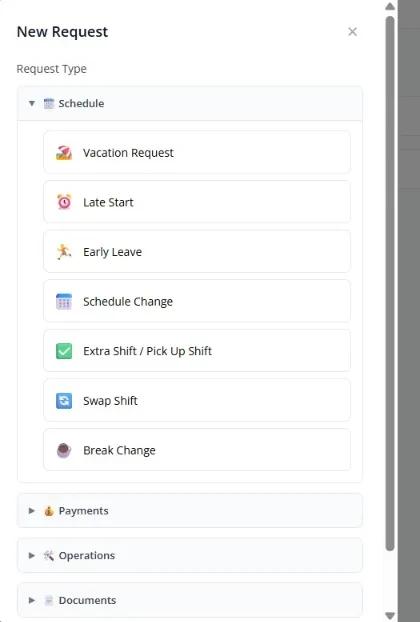
Schedule. Vacation Request covers one day or a date range. Late Start and Early Leave ask for a shorter window on a specific date. Schedule Change, Extra Shift / Pick Up Shift, Swap Shift, and Break Change are also request types. There is no separate “availability” request; availability lives on the staff record and the published week, not as its own Inbox category.
Payments. Commission Review, Tip Adjustment, and Payment Issue let staff raise a pay question without turning Inbox into payroll software. The request is recorded and decided. It does not calculate commissions or issue pay.
Operations. Supplies, Maintenance, and Client Issue are typed requests. A supply request can name items and quantities. A maintenance request names the issue, the area, and how urgent it is.
Documents. Staff can Request a Document from management, or Upload a Document such as a license, insurance, or certification. Inbox is the approval path. The file is stored on the employee’s Documents record after it is approved, not as a chat photo and not as the only copy of the license.
Other. Uncategorized items go to Other. Owners can also add custom request types for that salon.
Managers also receive automated Inbox items that staff do not create: a document-expiring alert, a staff birthday reminder, and inventory suggestions. Those are manager-facing, not extra buttons on the employee New Request list.
How Fair Flow Inbox works
The Fair Flow employee inbox is the product surface for this. Staff with send permission create a request. Managers with manage permission review the queue.
- The employee opens Inbox and starts a new request.
- They choose a type, vacation, late start, supplies, upload a document, and the rest of the list above.
- They fill in the fields that type needs: dates for time off, items for supplies, a file for a document upload.
- They send it to a manager. The item opens with status Open (supply requests also use Pending, which Inbox treats with Open).
- The manager sees it under To handle, grouped by type. They can filter by status. Open, Needs Info, Approved, Denied, Archived, and, in the manager view, by staff.
- The manager approves, denies, or asks for more information. A deny can include a note the requester can read. Needs Info lets the employee reply and put the item back in the open queue.
- The employee can open their own requests and see the status. Managers who handle Inbox can also receive a push notification when a new item is created.
- Archived items stay in Archived. Inbox is not a disposable chat thread.
General requests carry notes and typed fields. File attachments belong to document uploads. Inbox does not run a separate comment thread on every item.
When an approved request affects the schedule
This is employee scheduling, not client appointment booking. Approving an Inbox item does not rewrite the published week by itself.
Staff Schedule reads approved Vacation, Late Start, Early Leave, and Schedule Change requests as availability. A vacation or schedule-change approval marks those dates unavailable. A late start or early leave shortens the window for that day. Denied requests do not change availability.
That is not the same as deleting or moving published shifts. If Thursday still shows a shift on the board, a manager still has to place or remove that shift. Schedule Change also does not rewrite the employee’s default weekly hours; it blocks the dates listed on the request.
Extra Shift, Swap Shift, and Break Change can be submitted and approved in Inbox. Those approvals do not write Schedule data. Coverage still needs a second manager action on the week.
A small example that matches the product: a technician submits vacation for next Thursday and Friday. A manager approves it. On the next staff Schedule load, those two days show as unavailable. The manager still adjusts published shifts if someone else has to cover the floor. For how to build the week itself, see salon staff scheduling tips.
Licenses, documents and expiration reminders
Professional licenses do not live in Inbox as the filing cabinet. Employees can upload a license, insurance file, or certification through Upload a Document. A manager approves that request. The file then sits on the employee’s Documents record, which is where expiration is stored.
The expiration date is optional. If it is filled in and the document is approved, managers receive an in-app Inbox alert while 1 to 30 days remain. The alert does not lock the employee out of the app and it does not change their schedule. It also does not replace the state board. For the compliance side of keeping licenses current, read salon employee license tracking.
Employee birthday reminders
Birthdays are stored on the employee record. Fair Flow can create a staff birthday reminder in Inbox for managers and owners, using a default window of seven days before the date. That window can be changed in settings. The person whose birthday it is does not receive the reminder. The point is practical: a manager can recognize someone on the team without keeping a second calendar.
Supply requests and inventory
Staff can submit a Supplies request with items and quantities, tied to inventory rows when those links exist. The request appears in Inbox. When a manager approves it, Fair Flow adds those quantities to Inventory Order. It does not change current stock, and it does not create a separate shopping-list collection. After approval, a manager still uses Inventory’s Create Order flow to turn those order quantities into what actually gets purchased.
One inbox vs scattered messages
| Scattered messages | Fair Flow employee request workflow |
|---|---|
| Request buried in chat | Request stored by type in Inbox |
| No visible status | Open, Needs Info, Approved, Denied, or Archived |
| Manager relies on memory | The request remains in Inbox history, including Archived |
| A yes in chat may never reach the week | Approved vacation, late start, early leave and schedule change are read as staff availability; published shifts still need a manager |
| Supply request is verbal | Approval adds the quantity to Inventory Order, not to current stock |
| Document sent as a photo | Upload goes through Inbox; after approval the file is stored on the employee Documents record |
What Fair Flow Inbox does not do
- It is not client messaging.
- It is not a client appointment inbox.
- It does not replace payroll software. Commission and payment questions can be submitted; pay is not calculated there.
- It does not replace state licensing requirements, and an expired document does not change login or schedule by itself.
- It does not automatically rewrite published shifts, default weekly hours, extra shifts, swaps, or break times.
- It does not replace emergency communication. If the dryer is on fire, you still call someone.
- It is not a substitute for salon task management on the floor.
Why this matters for multi-location salons
Inbox items can carry a location. When a manager has a location selected in the header, the list is scoped to that branch, so a request for a technician who only works at one site does not appear while you are looking at another. Owners without an active location filter can see across the salon. That is location visibility inside one business, not a separate inbox per legal entity.
If you want the requests out of the group chat, book a 15-minute demo. Pricing is one page: Starter at $39/month per location, or Pro at $99/month for the first location and $79/month for each additional one.